1.7 Better identification for required questions (Low)
1.7.1 WCAG 3.3.2 (A) - Desktop
On different pages across the service, multiple questions are presented on a single page. Unlike the typical GOV.UK Design System pattern — where a single or small set of related questions are shown per page, generally within the initial viewport — this page contains a long list of questions, requiring users to scroll to view them all.
Although optional questions are generally labelled as such (refer Optional fields not marked as such (Medium) for exceptions), required fields are not indicated. This may cause uncertainty for users about which fields they must complete before proceeding. While the GOV.UK Design System guidance for question pages does not mandate labelling fields as required, this is largely because these pages normally contain only one or a few easily visible fields.
Here, given the longer list, the absence of clear instruction creates a risk of users missing questions, encountering error messages unnecessarily, or feeling unsure about what is expected of them. This can particularly affect users with cognitive impairments, memory difficulties, or those using screen readers.
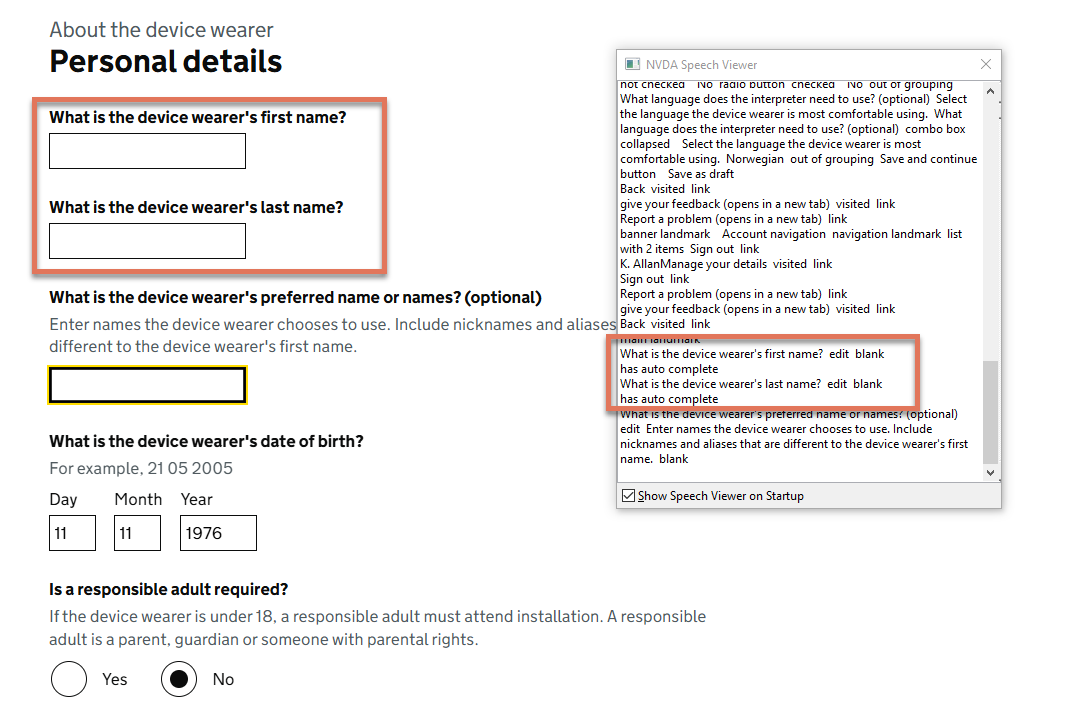
FIGURE 1.9: Optional and required questions on Personal Details page
1.7.2 Recommendation
Add a clear statement at the top of the page, such as: “All questions are required unless marked as optional.” Also add the required attribute to the <input> fields so that screen reader users are also informed as they navigate through the form.