2.3 Status tags on form overview page not programmatically associated with form names (Medium)
2.3.1 WCAG 1.3.1 (A) - Desktop
On the form overview page, status tags such as “Draft” or “Failed to submit” are displayed visually next to each form name. However, they are not programmatically linked to the corresponding form name via attributes like aria-describedby. As a result, screen reader users do not hear the status announced when focusing on the form link, missing important information about the form’s current state.
This occurs because the aria-describedby on the link references an ID (e.g., company-details-1-status) that does not exist in the page markup. Without a matching element, the association fails and screen readers do not receive the intended descriptive context.
This contrasts with the positive implementation highlighted in [Buttons are coded as links and dynamic updates are not announced by screen readers (High)]8, where status tags on individual form summary pages are correctly associated with the relevant links using aria-describedby, enabling screen readers to announce the form name and its status together.
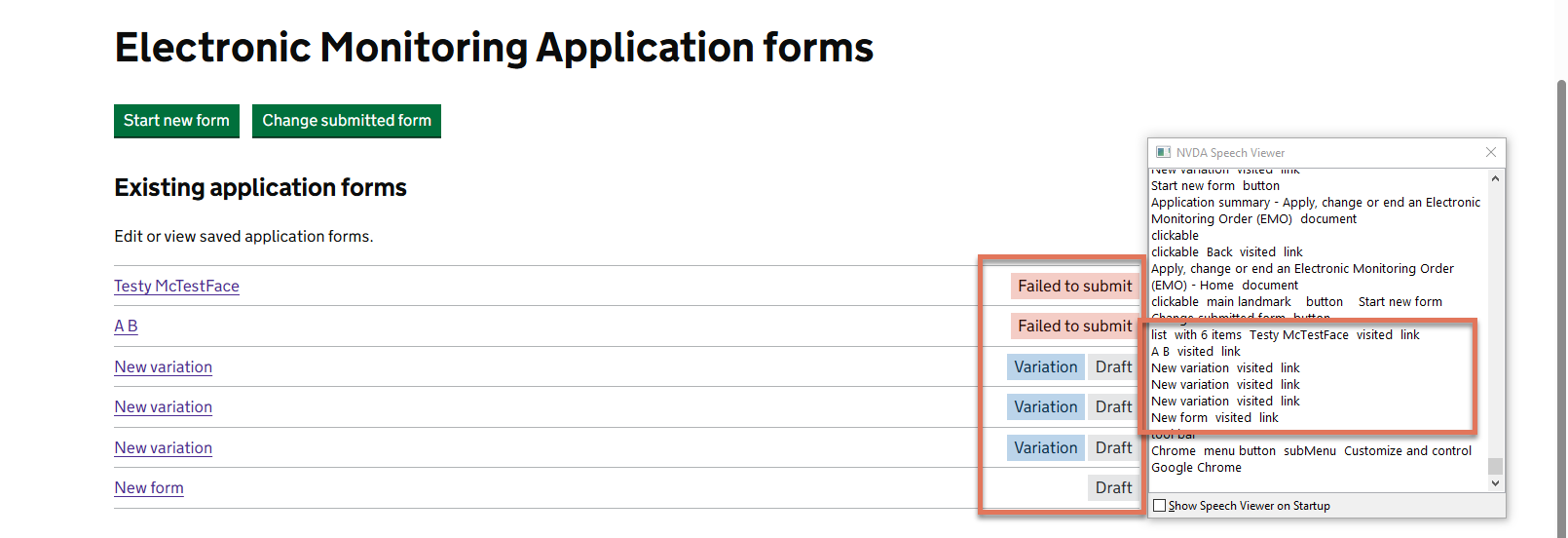
FIGURE 2.3: Form with status and NVDA speech viewer highlighted
2.3.2 Code Snippet
<li>
  <div>
    <a href="/.../summary" aria-describedby="company-details-1-status">
      Testy McTestFace
    </a>
  </div>
  <div>
    <strong class="govuk-tag govuk-tag--red">
      Failed to submit
    </strong>
  </div>
</li>
2.3.3 Recommendation
Ensure that every aria-describedby on a form link points to an existing element containing the status text. Update the markup so that the status tag has the correct ID and the link references it, allowing screen readers to announce both the form name and its current status.
<li>
  <div>
    <a href="/.../summary" aria-describedby="company-details-1-status">
      Testy McTestFace
    </a>
  </div>
  <div>
    <strong id="company-details-1-status" class="govuk-tag govuk-tag--red">
      Failed to submit
    </strong>
  </div>
</li>