3.3 Conditionally revealed radio inputs could be made clearer (Low)
3.3.1 WCAG 1.3.1 (A), 4.1.2 (A) - Automated Finding
On the Organisation Details page, certain radio buttons reveal a secondary input field when selected. For example, choosing the Crown Court option reveals an input stating “Select the name of the Crown Court”.
Visually, the dynamic behaviour is clear as the input appears immediately after selection. However, this change is not reliably communicated to screen reader users. As a result, blind or visually impaired users may not realise that new fields have appeared and may miss important form inputs.
Although aria-expanded is used on these radio inputs to indicate an expandable area, it is not valid on native <input type="radio"> elements. This causes inconsistent support: for instance, only NVDA with Firefox reliably announces the expanded/collapsed state. Other screen reader and browser combinations either ignore aria-expanded or raise errors. Automated tools like Accessibility Insights also flag this as invalid, because aria-expanded is not permitted on inputs.
Note that aria-expanded works as intended with checkboxes, as highlighted in [Graphs are inaccessible for screen reader users (Medium)]3.
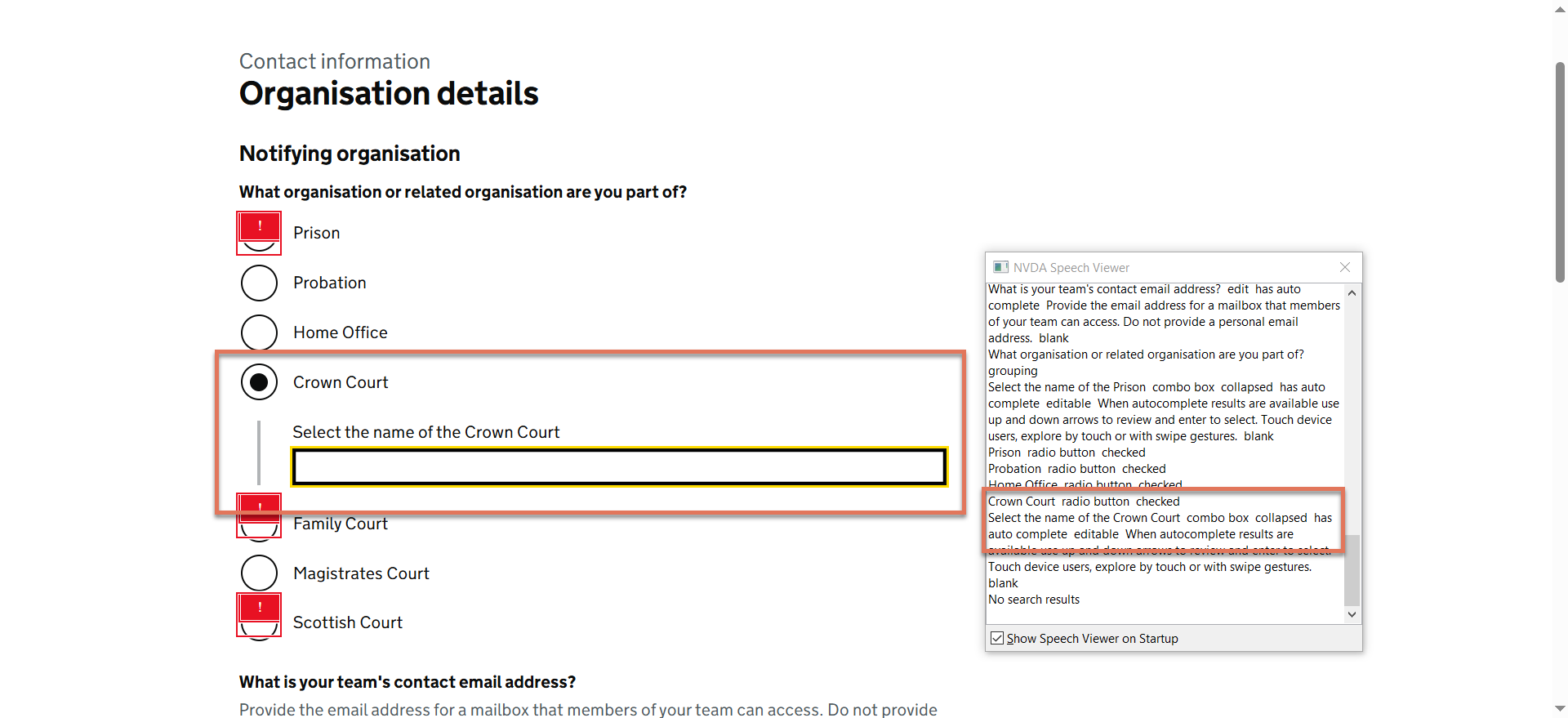
FIGURE 3.3: Expandable radio inputs with NVDA speech viewer activated
3.3.2 Code Snippet
<div>
<input id="notifyingOrganisation-4" type="radio"
          aria-controls="conditional-notifyingOrganisation-4" aria-expanded="true">
<label for="notifyingOrganisation-4">
  Crown Court
</label>
</div>
3.3.3 Recommendation
We recognise that the accessibility of conditionally revealed questions has been flagged by the GOV.UK Design System team. We also believe that informing all users of the expanded and collapsed state would be beneficial, and recommend continuing to reach out to the ARIA working group to add support for this behaviour.
Meanwhile, we recommend adding a visually-hidden <span> element to the label that informs screen reader users of the secondary input, such as:
<input id="notifyingOrganisation-4" name="notifyingOrganisation"
                                    type="radio" value="CROWN_COURT">
<label for="notifyingOrganisation-4">
  Crown Court
  <span class="govuk-visually-hidden">
    Selecting this will reveal an additional input
  </span>
</label>