User Vision logo
  • Accessibility Audit
    • Executive Summary
    • Summary of Findings
    • WCAG 2.2 Overview
      • WCAG 2.2 Compliance
  • Project Background
    • Approach
    • How to use this report
    • Understanding our findings
  • I Findings
  • 1 Journeywide Findings
    • 1.1 Positive: Secondary checkbox input announced effectively (Positive)
      • 1.1.1 WCAG 1.3.1 (A), 4.1.2 (A) - Desktop
      • 1.1.2 Code Snippet
    • 1.2 Positive: Select components are technically accessible (Positive)
      • 1.2.1 WCAG 1.3.1 (A), 4.1.2 (A) - Desktop
    • 1.3 Error summary skip links do not correctly move focus to date inputs (Medium)
      • 1.3.1 WCAG 2.4.3 (A) - Desktop
      • 1.3.2 Code Snippet
      • 1.3.3 Sources
      • 1.3.4 Recommendation
    • 1.4 Optional fields not marked as such (Medium)
      • 1.4.1 WCAG 3.3.2 (A) - Desktop
      • 1.4.2 Recommendation
      • 1.4.3 Resources
    • 1.5 Inconsistent back link behaviour (Medium)
      • 1.5.1 WCAG 3.2.3 (AA) - Desktop
      • 1.5.2 Recommendation
    • 1.6 Multiple level 1 headings used incorrectly on form pages (Low)
      • 1.6.1 WCAG 1.3.1 (A) - Desktop
      • 1.6.2 Recommendation
    • 1.7 Better identification for required questions (Low)
      • 1.7.1 WCAG 3.3.2 (A) - Desktop
      • 1.7.2 Recommendation
    • 1.8 Alert messages presented in reverse order (Low)
      • 1.8.1 WCAG 1.3.2 (A) - Desktop
      • 1.8.2 Sources
      • 1.8.3 Recommendation
  • 2 Service Homepage and Form Overview
    • 2.1 Positive: Status tags programmatically associated with link (Positive)
      • 2.1.1 WCAG 1.3.1 (A), 2.4.4 (A) - Desktop
      • 2.1.2 Code Snippet
    • 2.2 Radio inputs automatically filled on attempting to submit form (Medium)
      • 2.2.1 WCAG 3.2.2 (A), 3.3.4 (AA) - Desktop
      • 2.2.2 Recommendation
    • 2.3 Status tags on form overview page not programmatically associated with form names (Medium)
      • 2.3.1 WCAG 1.3.1 (A) - Desktop
      • 2.3.2 Code Snippet
      • 2.3.3 Recommendation
    • 2.4 Sections falsely appear navigable in any order (Low)
      • 2.4.1 WCAG 1.3.2 (A) - Desktop
      • 2.4.2 Recommendation
    • 2.5 Disabled button could be improved (Observation)
      • 2.5.1 Disabled button could be improved
      • 2.5.2 Code Snippet
      • 2.5.3 Recommendation
    • 2.6 Status tag does not reflect completion state for additional documents section (Observation)
      • 2.6.1 Status tag does not reflect completion state for additional documents section
      • 2.6.2 Code Snippet
      • 2.6.3 Recommendation
  • 3 Application Form Journey
    • 3.1 No error message shown when an empty curfew timetable form is submitted (Medium)
      • 3.1.1 WCAG 3.3.1 (A), 3.3.3 (AA) - Desktop
      • 3.1.2 Recommendation
    • 3.2 Curfew updates not announced to screen reader users (Medium)
      • 3.2.1 WCAG 4.1.3 (AA) - Desktop
      • 3.2.2 Recommendation
    • 3.3 Conditionally revealed radio inputs could be made clearer (Low)
      • 3.3.1 WCAG 1.3.1 (A), 4.1.2 (A) - Automated Finding
      • 3.3.2 Code Snippet
      • 3.3.3 Recommendation
    • 3.4 Telephone input could be supplemented with an example (Observation)
      • 3.4.1 Telephone input could be supplemented with an example
      • 3.4.2 Recommendation
    • 3.5 Typo in label text (Observation)
      • 3.5.1 Typo in label text
      • 3.5.2 Recommendation
    • 3.6 Disabled checkbox text difficult to read due to low contrast (Observation)
      • 3.6.1 Disabled checkbox text difficult to read due to low contrast
      • 3.6.2 Recommendation
  • 4 Completed Form
    • 4.1 Positive: Confirmation step prevents accidental data loss (Positive)
      • 4.1.1 WCAG 3.3.4 (AA) - Desktop
    • 4.2 Download button could be supplemented with file type and size (Observation)
      • 4.2.1 Download button could be supplemented with file type and size
      • 4.2.2 Recommendation
  • 5 Changes in this version of the form
  • II Recommendations
  • 6 Suggested Next Steps
  • III Appendix
  • Contact Details
  • Prepared by User Vision for the Ministry of Justice

UV3228 [DAT0060] MoJ - Create an Electronic Monitoring Order

1.5 Inconsistent back link behaviour (Medium)

1.5.1 WCAG 3.2.3 (AA) - Desktop

Across the service, every form submission causes the page to reload resulting in the browser treating the current page as a new history entry each time. Consequently, when users click the “Back” link, they are often taken to an earlier state of the current page (such as an empty or partially completed form) rather than the previous step in the journey. This disrupts the expected linear progression and can leave users confused about where they are in the process.

For example, after two failed submissions on a single form, clicking “Back” twice may keep the user cycling through different versions of the same page instead of returning them to the actual previous screen. This behaviour is particularly problematic for keyboard and screen reader users who rely on predictable navigation to maintain their orientation in the process.
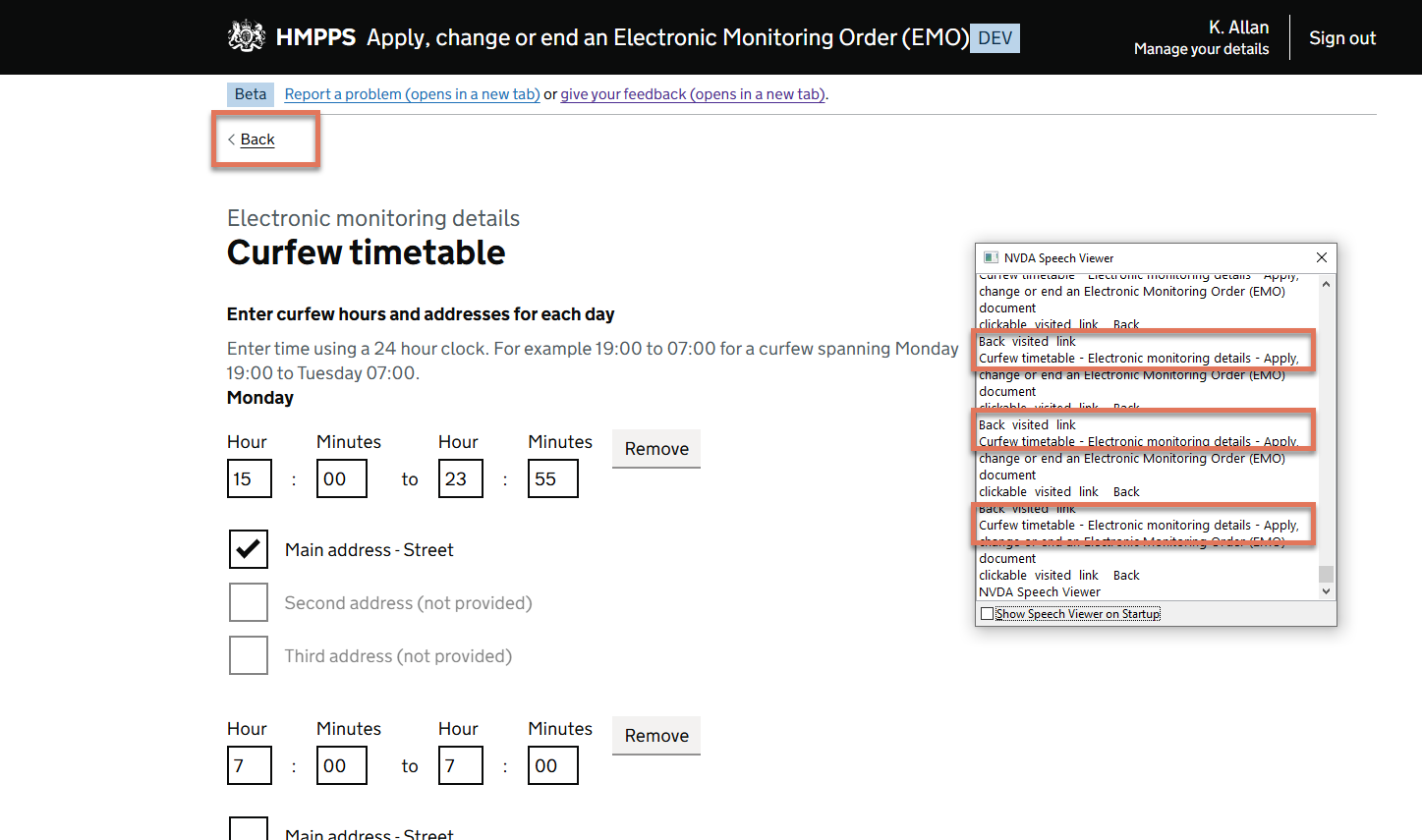
NVDA speech viewer highlighting same page load

FIGURE 1.6: NVDA speech viewer highlighting same page load

1.5.2 Recommendation

Where possible, consider using client-side validation for simple errors so the page does not reload unnecessarily when correcting common mistakes. This preserves a cleaner browser history.

Alternatively, implement logic on the “Back” link to skip duplicate history entries of the same page. For example, use JavaScript to direct users to the last unique page in the journey rather than relying on the browser’s default history.back() behaviour.

These changes would ensure users can navigate the form journey confidently without getting stuck or disoriented due to repeated reloads.