2.5 Disabled button could be improved (Observation)
2.5.1 Disabled button could be improved
On the summary page, the “Submit form” button is visually disabled using reduced opacity until all required form sections are completed. However, because the button uses the native disabled attribute, it is completely removed from the tab and screen reader focus order. As a result, screen reader users are unaware of the button’s presence or that it will become available after completing certain sections. This could lead to confusion about how to proceed or why the form cannot yet be submitted.
Using aria-disabled in combination with CSS styling would allow the button to remain in the focus order, making its existence and current inactive state clear to assistive technology users. Currently, the disabled attribute overrides aria-disabled, preventing this behaviour.
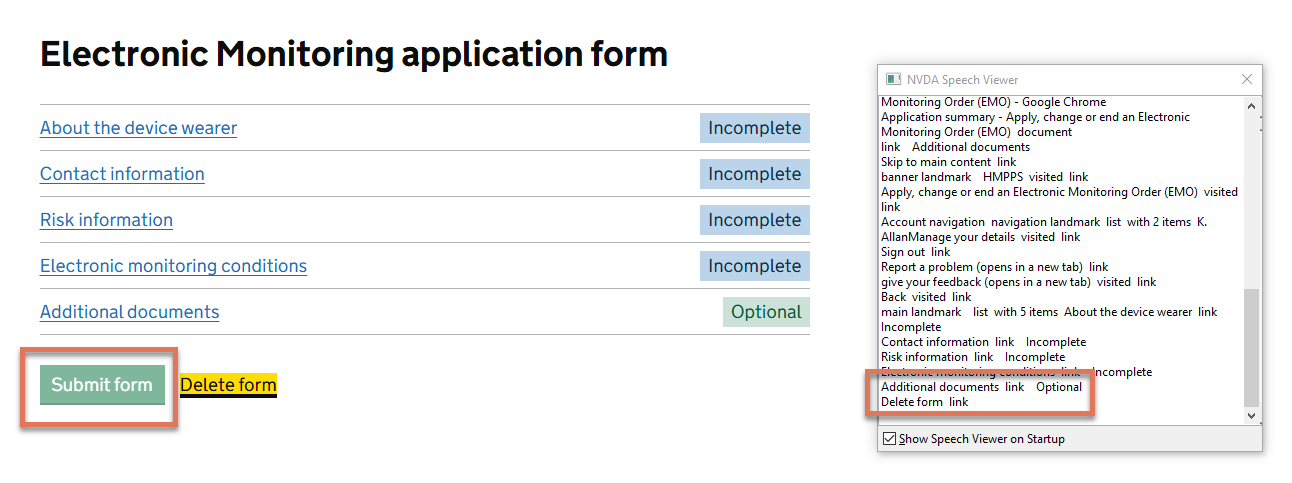
FIGURE 2.6: Disabled button on Summary page
2.5.2 Code Snippet
<button type="submit" disabled aria-disabled="true">
  Submit form
</button>
2.5.3 Recommendation
Remove the native disabled button and keep only the aria-disabled="true" attribute. Apply visual styling through CSS to indicate the disabled state. This ensures the button remains in the focus order, allowing screen reader users to perceive its presence and understand that it will become active once all required sections are completed.
Note that this is one of the few instances where we recommend using ARIA instead of native HTML elements.