2.4 Sections falsely appear navigable in any order (Low)
2.4.1 WCAG 1.3.2 (A) - Desktop
On the form summary page, all sections are displayed as links, giving the impression that they can be completed in any order. However, attempting to access the Curfew page within the “Electronic Monitoring Conditions” section before completing the “Contact Information” section results in users being unable to proceed, as the address choices required for setting curfew details are greyed out. This effectively blocks progress but only after the user has already navigated into the section, without any prior indication that the “Contact Information” section must first be completed.
This hidden dependency creates a mismatch between user expectations and actual functionality, which can cause frustration and confusion.
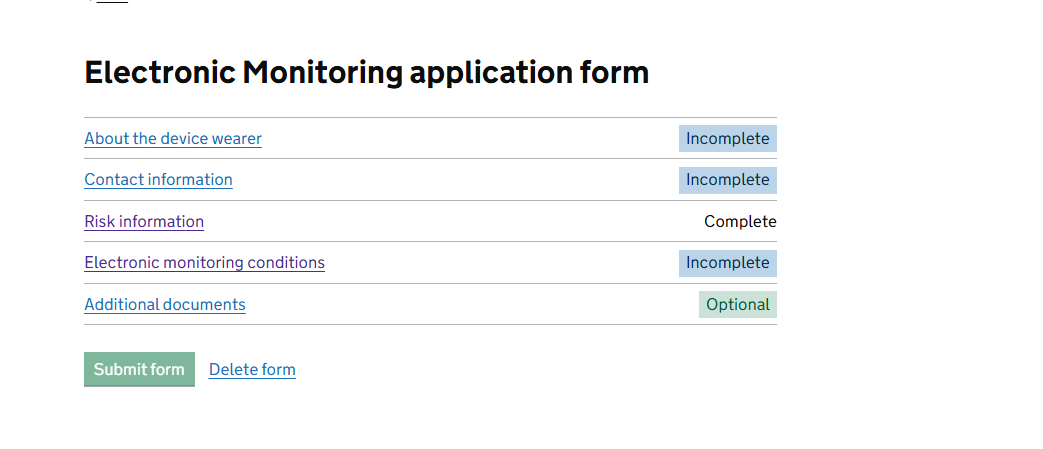
FIGURE 2.4: Application form with links to each section
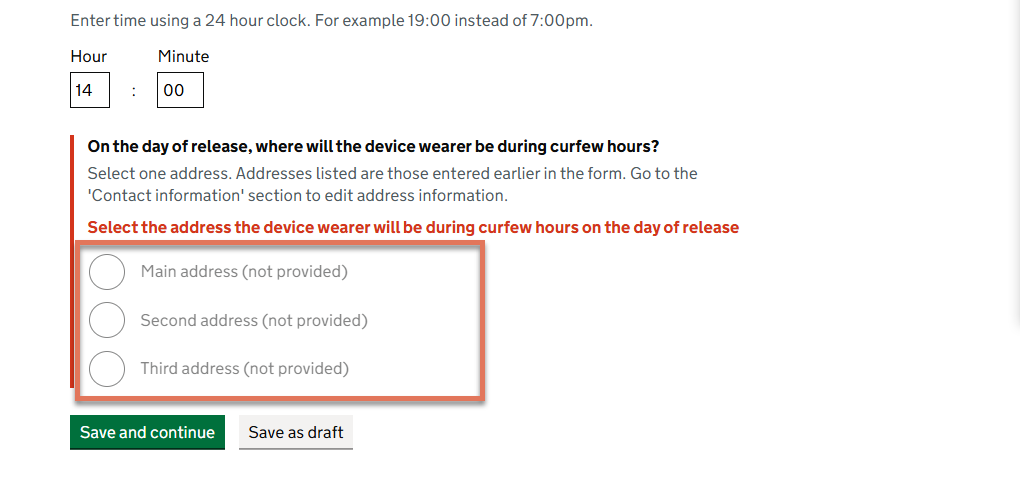
FIGURE 2.5: Error message on Curfew Monitoring page
2.4.2 Recommendation
Clearly communicate the dependency between sections directly on the form summary page. This can be achieved by disabling the “Electronic Monitoring Conditions” link until the “Contact Information” section is marked as complete.
Provide explanatory text such as, “This section will unlock once Contact Information is complete”, so users understand why the link is not yet available.
<li>
  <div>
    <span aria-disabled="true" class="disabled-link">
      Electronic Monitoring Conditions
    </span>
    <p class="govuk-hint">
      Complete Contact Information before starting this section.
    </p>
  </div>
</li>