2.6 Status tag does not reflect completion state for additional documents section (Observation)
2.6.1 Status tag does not reflect completion state for additional documents section
On the form summary page, each section is marked with a status tag indicating whether it is “Complete” or “Incomplete”. However, the final section “Additional documents” uses a status tag labelled “Optional” instead. This correctly communicates that completing this section is not mandatory.
However, even after users upload documents, the status tag remains “Optional” and does not update to “Complete” like the other sections. This inconsistency in status labelling may confuse users about whether their uploaded documents have been registered or whether further action is required.
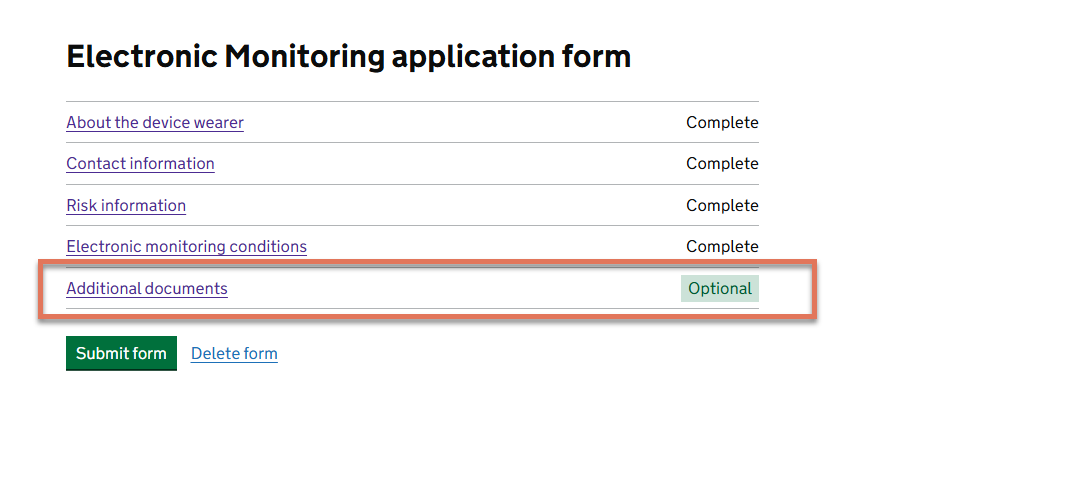
FIGURE 2.7: Additional documents link on Monitoring Application Form
2.6.2 Code Snippet
<li>
  <div>
    <a href="/.../attachments" aria-describedby="sections-5-status">
      Additional documents
    </a>
  </div>
  <div id="sections-5-status">
    <strong>Optional</strong>
  </div>
</li>
2.6.3 Recommendation
Update the implementation so that the status tag reflects the completion state of the “Additional documents” section dynamically, consistent with other sections in the task list.
This can be done by changing the link label text to “Additional Documents (optional)” with the status tag reading “Complete” or “Incomplete”.
<a href="/.../attachments" aria-describedby="sections-5-status">
Additional documents (optional)
</a>
Alternatively, providing users the option to manually mark the section as complete could also be helpful.